¶ Internal Network Infrastructure Documentation
¶ Pihole / internal name resolution
A wildcard DNS entry for *.home.lan has been configured and points to 192.168.1.4 (kryptovisor)
this required specific configurations:
data/pihole/etc-pihole/pihole.toml
[dns]
listeningMode = "ALL"

[misc]
etc_dnsmasq_d = true
data/pihole/etc-dnsmasq.d/99-local-domains.conf (created file)
# Wildcards for internal
address=/.lan/192.168.1.4
Pihole is the configured dns server foir the home router
¶ Server/VM Configuration
Get interfaces:
ip link show
ip link show 1: lo: <LOOPBACK,UP,LOWER_UP> mtu 65536 qdisc noqueue state UNKNOWN mode DEFAULT group default qlen >1000 link/loopback 00:00:00:00:00:00 brd 00:00:00:00:00:00 2: enp4s0: <BROADCAST,MULTICAST,UP,LOWER_UP> mtu 1500 qdisc mq state UP mode DEFAULT group default qlen 1000 link/ether 3c:7c:3f:ee:cb:39 brd ff:ff:ff:ff:ff:ffNote
YOURMac address!
(In the example above, this is3c:7c:3f:ee:cb:39)
create network link file to fix the name:
/etc/systemd/network/10-persistent-name.link
[Match]
MACAddress=YourMacAddress

[Link]
Name=enp1s0
create network configuration so set an ip address:
sudo nano /etc/netplan/config.yaml
network:
    version: 2
    renderer: networkd
    ethernets:
      enp1s0:  # -> Make sure you created a link file! -> /etc/systemd/network/10-persistent-name.link
        addresses:
          - 192.168.1.100/24
        routes:
          - to: default
            via: 192.168.1.1
        nameservers:
          addresses:
            - 192.168.1.1
            - 8.8.8.8
            - 8.8.4.4
remarks:
- the network interface name can change due to adding or removing pcie interfaces such as gpus etc.
¶ Network Topology
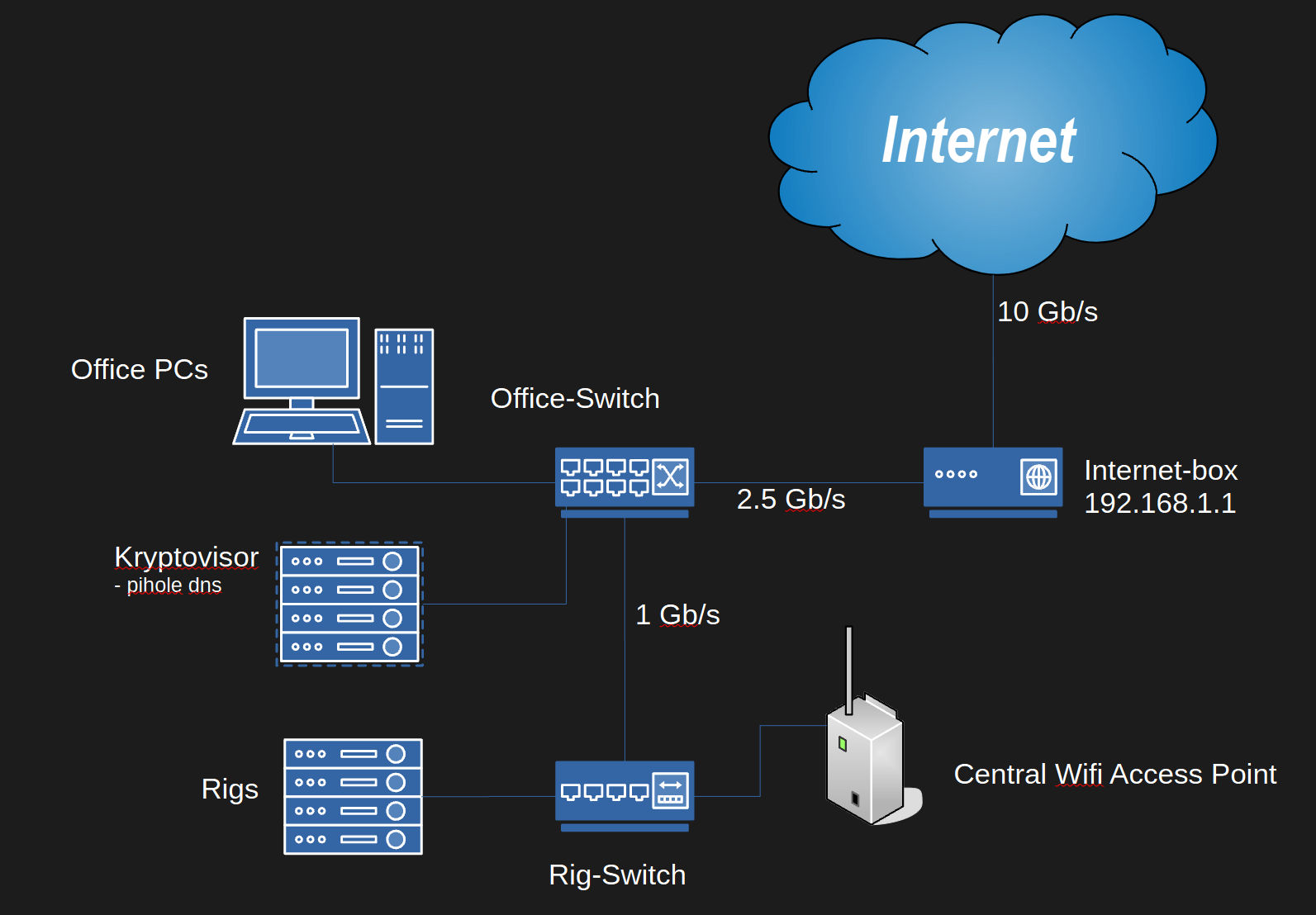
¶ Diagram
¶ Hardware Inventory
¶ Routers
- Model: Swisscom Internet Box
- Location: Living Room
- Configuration details: 192.168.1.1
DHCP
¶ Switches
- TP Link 2.5G
- Office Main switch
- Plain, unmanaged
- TP Link 1G
- Rig Switch
- Plain, unmanaged
¶ IP Addresses
¶ Address ranges:
| From | To | Count | Description |
|---|---|---|---|
| 192.168.1.1 | 192.168.1.1 | 1 | Gateway |
| 192.168.1.2 | 192.168.1.20 | 19 | Reserved / Infrastructure Servers |
| 192.168.1.21 | 192.168.1.100 | 79 | Reserved / Application Servers |
| 192.168.1.101 | 192.168.1.150 | 50 | Reserved / Webservers |
| 192.168.1.151 | 192.168.1.251 | 100 | Dynamic / DHCP / Clients |
| 192.168.1.252 | 192.168.1.254 | 2 | Reserved / VPN |
| 192.168.1.255 | 192.168.1.255 | 1 | Reserved / Broadcast |
¶ Reservation Tables:
¶ Infrastructure (1 - 20)
| Server Name | IP Address | Location | Master | Additional Info |
|---|---|---|---|---|
| Swisscombox | 192.168.1.1 | Living Room | Swisscom | Primary Gateway |
| drg-vpn | 192.168.1.2 | Office | Office Switch | ubuntu hypervisor |
| drg-reverseproxy | 192.168.1.3 | Kryptovisor | Office Switch | ngix web router |
| kryptovisor | 192.168.1.4 | Office | Office Switch | Main Hypervisor |
| DRG-FS01 | 192.168.1.5 | Office | Office Switch | Synology Nas |
| drg-singularity | 192.168.1.6 | Office | Office Switch | Orange PI |
| kryp-exchangedatafetcher | 192.168.1.7 | Office | Office Switch | Orange PI |
| drg-kerberos | 192.168.1.8 | Office | Office Switch | Kryptovisor VM |
| drg-k8s | 192.168.1.9 | Office | Office Switch | Kryptovisor VM |
¶ Application servers (21 - 100)
| Server Name | IP Address | Location | Master | Additional Info |
|---|---|---|---|---|
| DRG-App01 | 192.168.1.21 | Office | Office Switch | Win Server BTF |
| kryp-ftp | 192.168.1.22 | Kryptovisor | Office Switch | FTP Server |
| kryp-git | 192.168.1.23 | Kryptovisor | Office Switch | Git Server |
| drg-minecraft | 192.168.1.24 | Kryptovisor | Office Switch | Minecraft Server |
| kryp-chiafullnode | 192.168.1.25 | Kryptovisor | Office Switch | XCH Fullnode |
| kryp-chiatestnet | 192.168.1.26 | Kryptovisor | Office Switch | XCH Testnet Fullnode |
| kryp-btf | 192.168.1.27 | Kryptovisor | Office Switch | BTF Wallet Server |
| kryp-chiatestclient | 192.168.1.28 | Kryptovisor | Office Switch | chia wallet tests |
| kryp-rig0001 | ||||
| Home-Office-Computer | 192.168.1.30 | Office | Office Switch | High Performance PC |
| Card storage | 192.168.1.31 | Office | Office Switch | Raspberry Pi 5 |
| kryp-chiastats | 192.168.1.32 | kryptovisor | Office Switch | |
| drg-downloader | 192.168.1.33 | kryptovisor | Office Switch | all kinds of download managers |
| drg-aidevtools | 192.168.1.34 | kryptovisor | Office Switch | python environment with several tools for ai development |
| drg-ai001 | 192.168.1.35 | rig, lower computer | Office Switch | runs ai networks |
to be updated:
| kryp-rig0001 | 192.168.1.29 | Kryptovisor | Mining Switch | Mining Rig |
¶ Web Servers (101 - 150)
| Server Name | IP Address | Location | Master | Additional Info |
|---|---|---|---|---|
| drg-internalkb | 192.168.1.101 | Kryptovisor | Office Switch | This KB Server |
| drg-tasks | 192.168.1.102 | Kryptovisor | Office Switch | Tasks Kanban Server |
| drg-knowledgebase | 192.168.1.103 | Kryptovisor | Office Switch | public wiki.js |
¶ Printers & IOT (151 - 200)
| Server Name | IP Address | Location | Master | Additional Info |
|---|---|---|---|---|
| Voron 3d Printer | 192.168.1.151 | Office | Internetbox |
¶ Other devices (201 - 254)
| Server Name | IP Address | Location | Master | Additional Info |
|---|---|---|---|---|
| SurePetcareHub | dhcp | Livingroom | Internetbox | Cat Door Server |
¶ Open ssh proxy tunnel for isolated devices
¶ Requirements
-
openssh server installed on server and Client
-
install proxychains on the target device.
note: you can create an offline package by the following comands:
sudo apt-get update
apt-get download proxychains4
apt-cache depends proxychains4 | awk '/Depends/ {print $2}' | xargs apt-get download
you can then transfer the .deb packages to the target machine and install them with:
sudo dpkg -i *.deb
¶ Steps
- edit your ssh config.
- windows: C:\ProgramData\ssh\sshd_config
- linux: sudo nano /etc/ssh/sshd_config
AllowTcpForwarding yes
GatewayPorts yes
- open a proxy server:
ssh -D 1080 -N localhost
-> leave the server open, open a second cli window
- Open reverse proxy from server to client:
ssh -R 1080:localhost:1080 aiadmin@172.10.1.254
- on the server, try:
curl -x socks5h://localhost:1080 -I http://google.com
- pipe a command through proxychains
sudo proxychains apt update
¶ Maintenance Schedules
¶ Hardware Maintenance
- Regular maintenance tasks and intervals for hardware components.