¶ Introduction
Program Performance is a topic which gets less prevalent nowadays.
This is most likely related to the ever increasing computational speed of computers. It has become less relevant to optimize code. Because usually, you optimize until its "good enough". Hardware has become so fast, that even suboptimal solutions can often be "good enough" today.
This leads to lagging software and increased energy consumption, despite the efficiency and Speed gains of the hardware.
¶ Performance Pitfalls
- Nested Loops:
Using nested loops can drastically increase time complexity (e.g., O(n²)), making your code slow for large inputs. Replace them with more efficient algorithms or data structures. - Inefficient Data Structures:
Using lists for frequent lookups or inserts (O(n)) instead of hash maps or balanced trees (O(1) or O(log n)) can degrade performance. - Unnecessary Memory Allocations:
Frequent object or array allocations can increase garbage collection overhead. Reuse objects where possible to reduce memory churn. - Blocking I/O Operations:
Synchronous I/O can cause significant slowdowns. Use asynchronous I/O to keep your CPU busy while waiting for data. - Unoptimized Recursion:
Deep recursion without tail call optimization can lead to stack overflow or excessive memory usage. Convert to iterative solutions where feasible.
¶ possible performance gains
Despite the increased speed of modern hardware, optimizing code still offers significant benefits. Particularly when working with large datasets, real-time systems, or power-sensitive devices.
Optimized code can easily run 1000 up to millions of times faster than unoptimized Code
Some of the most impactful performance improvements can be achieved through:
- Algorithm Optimization: The choice of algorithm can dramatically affect performance. For example, replacing a nested loop (O(n²)) with a hash-based lookup (O(n)) can lead to exponential speed improvements.
Example: Consider sorting algorithms. A poorly chosen algorithm like bubble sort (O(n²)) will struggle with large datasets, while quicksort or mergesort (O(n log n)) can handle the same data much faster.
Sorting a list of 1,000,000 elements with bubble sort might take minutes, while quicksort can do it in seconds.
// Poor example (O(n²)): Bubble Sort
for (int i = 0; i < n; i++)
    for (int j = 0; j < n - i - 1; j++)
        if (arr[j] > arr[j + 1])
            Swap(arr, j, j + 1);

// Optimized example (O(n log n)): QuickSort
QuickSort(arr, 0, n - 1);
- Data Structure Optimization Choosing the right data structure can also reduce time and memory usage. For instance, using a hash map for constant time lookups instead of an array or list can reduce lookup time from O(n) to O(1). In large applications, this leads to significant gains, especially when performing repetitive operations.
Example: In the "Two Sum" problem, using a dictionary allows for O(1) lookups instead of iterating through the list with O(n) complexity, making the code significantly faster for large datasets.
// Suboptimal (O(n²)): Nested loops
for (int i = 0; i < nums.Length; i++)
    for (int j = i + 1; j < nums.Length; j++)
        if (nums[i] + nums[j] == target) return new[] { i, j };

// Optimized (O(n)): Hash map lookup
Dictionary<int, int> remainders = new Dictionary<int, int>();
for (int i = 0; i < nums.Length; i++)
    if (remainders.TryGetValue(nums[i], out int index)) return new[] { index, i };
- Parallelism and Concurrency: Modern processors are highly parallel, and utilizing this can bring dramatic performance improvements. Tasks that can be split into independent subtasks (e.g., image processing, batch computations) can benefit greatly from multi-threading or parallel processing, reducing overall execution time.
Example: Processing a large image can be split into chunks and processed in parallel. Instead of processing each pixel sequentially, you could leverage parallel loops to divide the work across multiple CPU cores.
// Sequential processing (single-threaded)
for (int i = 0; i < image.Height; i++)
    for (int j = 0; j < image.Width; j++)
        ProcessPixel(image[i, j]);

// Optimized processing (parallelized)
Parallel.For(0, image.Height, i =>
{
    for (int j = 0; j < image.Width; j++)
        ProcessPixel(image[i, j]);
});
-
Memory Management: Inefficient memory usage can slow down applications, especially when dealing with large objects or frequent allocations. Minimizing allocations, reusing objects, and applying pooling techniques can improve both speed and memory footprint.
Example: If you're constantly allocating large arrays or objects in a loop, consider object pooling, which reuses preallocated objects, avoiding costly allocations and garbage collection pauses. -
I/O Optimization: Input/output operations (file reading/writing, database access) are often bottlenecks in programs. Techniques like buffering, asynchronous I/O, and caching frequently accessed data can greatly reduce wait times.
Example: Reading a file line by line synchronously can slow down an application, but using asynchronous file I/O allows the CPU to continue processing while waiting for I/O operations to complete.
¶ Process of Opimization
The Process of Optimization is iterative. In general you try to find the Choke point, fix it and repeat.
Imagine you are on a 5 lane Highway. there is not much traffic on it. But there is one location with a construction with only one lane. This causes a 30 Minute traffic jam.
You could add additional lanes to the highway but there would not be a speed improvement.
What you need to do is find the biggest congestion (the construction site) and releave it. This will cause a 30 Minute speed improvement for trespassing cars.
You will now find new congestions in other Places. Perhaps somewhere 2 Lanes are Blocked which you resolve.
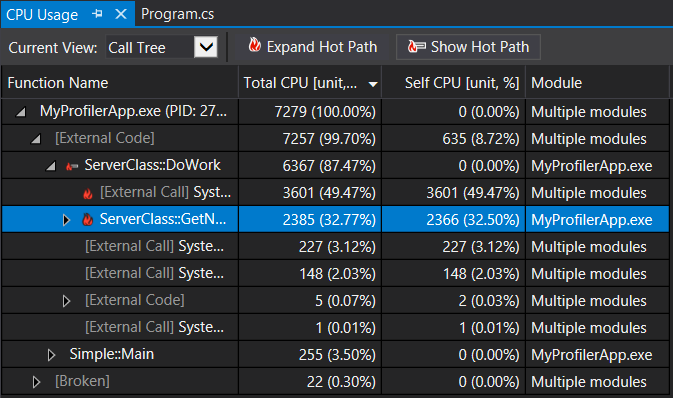
This is usually done using a Performance profiler. The Performance analyzer lets you investigate the Memory consumption and which functions take up the most processor time on your Program. This is called "the hot path"
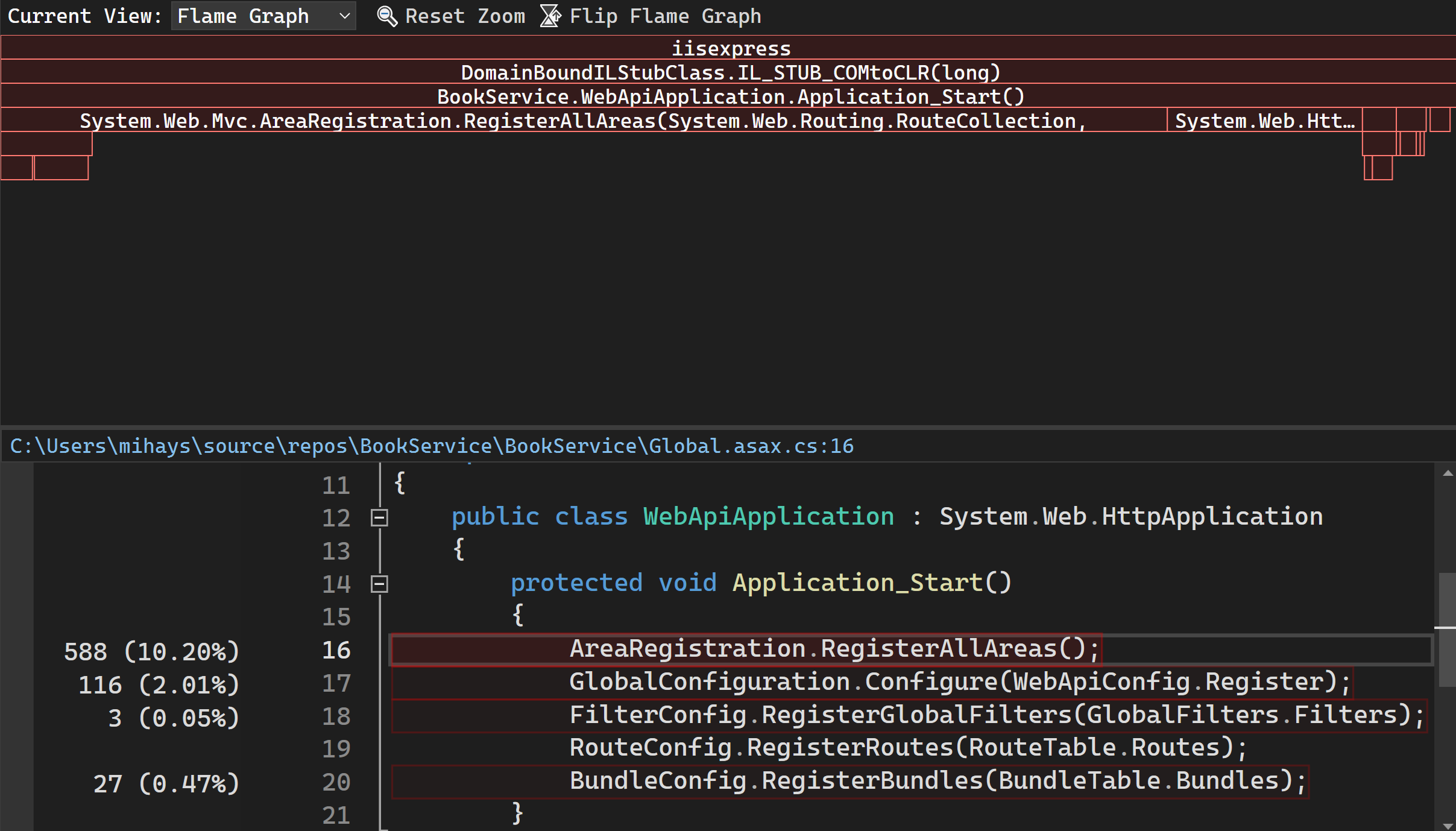
IDEs often can also overlay the time taken per Line in the editor: